top of page
Symmetrical Geometric Lines

AMA | All Marketing Agency

AMA is committed to making marketing easily accessible for everyone, enabling them to achieve meaningful results while positively impacting the marketing industry.

Our Services

AMA provides a variety of services to help your business succeed.

Please ask me anything you are curious about or need help with.

What we support?

We provide explanations and tips on how to use marketing tools so that you can fully understand and use them.

Understanding of marketing tools

We help you streamline your business operations by sharing valuable strategies and insights.

Strategy

We’ll cover the fundamentals and strategies of marketing, along with tips for effective content creation.

Marketing

Providing foundational SEO knowledge tailored to your specific situation, we assist you in implementing effective SEO strategies by offering evaluations and requirements for each company.

SEO

Stop wasting 'TIME', 'MONEY', and 'EFFORT'

“Consulting with marketing specialists and experts in UAE, Korea”

“Blog visitor 1000% incresed traffic”

Online, Offline SEO, GA4 / 500+ Companies Consulted Experience”

AMA Managing Director

Jeong Hyeon

Jeong Hyeon

Drawing on my experience consulting for over 500+ companies in both online and offline SEO, marketing, and project management, I offer valuable insights that can drive your business success.

Check the consultant's expertise

Instagram Grid (Feed) Layout Change: 4:5 Reels and Grid - How to Fix 'Fit to Feed' Issues!

The Instagram grid area, visible on an Instagram profile, is where all previously uploaded content is displayed in one view. As shown in the image below, it plays a crucial role in shaping first impressions by showcasing brand or product images through the 'Fit to Feed' feature. This element significantly impacts whether users decide to follow the account. Keeping the grid clean and consistent enhances visual appeal and helps convey professionalism. [Instagram Grid and Reels 'Fit to Feed' View] Mobile grid Mobile reels PC grid *Check it out on Instagram! (ID: @ama_allmarketingagency) Q1. Changes to the Instagram Grid Layout PC Version: The grid layout remains the same, keeping the original 1:1 aspect ratio. There are no changes here. Mobile Version: The feed aspect ratio has been changed to 4:5. Previously, both PC and mobile used the same 1:1 aspect ratio, but t his update has resulted in a difference between the PC and mobile feed layouts. Q2. Issues Caused by the Recent Update Limitations of the 'Fit to Feed' Feature The change from a square (1:1) aspect ratio to 4:5 has caused images to be automatically enlarged or cropped at the top and bottom, making it harder to precisely align the feed. Lack of Consistency Between PC and Mobile While PC still retains the 1:1 ratio, mobile now uses the 4:5 ratio. This inconsistency has made it challenging to optimize images for both platforms simultaneously. Impact on Brand Strategy and Feed Design Many brands and creators have relied on grid-based layouts (e.g., puzzle feeds) to showcase their brand identity with a unified visual style. However, this update makes it difficult to maintain previous strategies, potentially leading to negative effects on branding and content visibility. Q3. How to Adjust Grid and Reels with the 'Fit to Feed' Feature Follow these steps to align your feed for both PC and mobile: [Steps for 'Fit to Feed'] 1.Prepare Your Image Create an image with dimensions of 3240px x 3840px . (Additional steps can follow depending on your instructions.) How to Prepare Images Using Canva for Instagram 'Fit to Feed': 2.Split the Image into Sections Split image from PineTools Setting Upload image Split by: Both(grid) Vertically: 2 , Horizontally: 3 pinetools 사용 요령 3.List up Organize it in reverse order, starting with the most last piece . 이미지 정리 요령 4.Upload way Have to upload by phone from reels upload. For grid view adjust from preview mode (* Due to image enlargement, it can currently only proceed in a 3x2 format.) Q5. General Review of the Instagram Update The latest update aimed to enhance the feed experience for mobile users, but in reality, it has made the user experience more inconvenient. In particular, the mismatch between PC and mobile layouts has caused confusion for creators and brand marketers, compounded by the lack of clear guidelines. Ultimately, this update has not only failed to improve user experience but has also introduced various challenges for marketing and brand management. While updates to enhance user experience are essential and important, it would have been better if this process had been handled more carefully and accompanied by clearer guidelines. Q6. How Should We Respond Moving Forward? Content Creation to Adapt to the New Ratios Consistently test and experiment internally to find the most suitable upload formats. Track Updates and Wait Monitor changes closely, as a new update may be released that ensures consistency between PC and mobile platforms. Strengthen Communication with Followers Inform your followers about any inconveniences caused by the update and share the process of adapting to the new format with them. We Want to Hear From You! What are your thoughts on Instagram’s switch to the 4:5 aspect ratio? If you have any creative feed design ideas that fit the new ratio, share them in the comments!

🤫'Incognito Mode' is really can hide everything?

Many people use their browser's 'Incognito Mode' or 'InPrivate Mode' to protect their personal information online or to secure accurate test data. But does it really work? Can website operators truly not see you when you visit in Incognito Mode? An Unexplained Indexing Issue on a Wix Website Recently, an unexplained indexing issue on my Wix website caused a sharp drop in visitor numbers. I took this opportunity to conduct an interesting experiment: 'To what extent can data analysis tools (like GA4) track my footprints if I visit a website using different browsers and connection methods?' Through this article, I hope you'll uncover the truth about Incognito Mode and the process of online data tracking that you've always been curious about. 🧪 Test Overview For an accurate comparison, all tests were based on Google Analytics 4 (GA4)'s 'Realtime report'. I confirmed that the 'Active users in last 5 minutes' was zero before attempting to connect from each different environment. Tracking Verification Tools : Google Analytics 4 (GA4), Meta (Facebook) Events Manager (GA4 is one of the most popular and free-to-use analytics tools available to anyone.) Test Environments : Desktop : Chrome, Edge, DuckDuckGo browsers (Normal Mode / Incognito or Private Mode) Mobile : Samsung Internet, Chrome, DuckDuckGo Test Process Image showing tracking from Chrome Browser - Tracking Confirmed [Image showing tracking from Chrome Browser in Incognito Mode - Tracking Confirmed] [Image showing tracking from Edge Browser - Tracking Confirmed] [Image showing tracking from Edge Browser in InPrivate Mode - Tracking Confirmed] [Image showing tracking from (Mobile) Samsung Browser - Tracking Confirmed] [Image showing tracking from (Mobile) Chrome - Tracking Confirmed] [Image showing tracking from (Mobile, PC) DuckDuckGo Browser - Tracking Not Confirmed] 📊 The Shocking Result: Most Connections Were Being Tracked To get straight to the point, most connections made in Incognito Mode were successfully tracked by GA4. 1. Chrome & Edge Browsers (Normal Mode vs. Incognito/InPrivate Mode) Not only in normal mode but also in Chrome's Incognito and Edge's InPrivate modes, key information such as visitor, location, and visited pages were recorded in GA4 in real-time. 🤔 Why is Incognito Mode tracked?  This is a common misconception. The core function of Incognito Mode is 'not leaving a record on my computer,'  not 'not leaving a trace on the website's server.'  This means that while your Browse history and cookies are deleted from your PC when you close the browser, the website's analytics scripts (like GA4) operate normally and send data to the server during your session. Your IP address is also not hidden. Sources : How Incognito Browse works  on the Google Chrome Help Center. What is incognito mode and how does it work?  by Lenovo. 2. The Privacy-Focused Browser: DuckDuckGo DuckDuckGo's tracker blocking notification No records were left in GA4 from either the desktop or mobile app. The reason can be inferred from the notification that appears when launching the DuckDuckGo browser, such as "We blocked a tracking attempt by Google. 🛡️ Why isn't DuckDuckGo tracked?  The DuckDuckGo browser goes beyond simply deleting records; it actively blocks the tracking scripts embedded in webpages. Since it prevents the loading of scripts necessary for analytics tools like GA4 to operate, the website isn't even aware that a visitor has arrived. Source : What Is DuckDuckGo?  on the official DuckDuckGo Blog. 3. 🕵️‍♂️ At-a-Glance Comparison: Incognito Mode vs. Privacy-Focused Browsers After seeing the test results, you might be wondering, "Don't they both protect privacy? What's the difference?" Here’s a simple table summarizing the key differences. Feature Incognito Mode (Chrome, Edge, etc.) Privacy-Focused Browser (DuckDuckGo, etc.) Primary Goal Prevents leaving records on your device (PC/Mobile). Blocks online technologies that track you. How It Works Deletes Browse history, cookies, and form data upon closing. Actively blocks website tracking scripts, ad fingerprinting, etc. Website Tracking (GA4) Possible ✅  (Your connection record is sent to the server). Almost Impossible ❌  (The tracking script itself doesn't run). IP Address Hiding No ❌ No ❌ (It's different from a VPN). Best Use Case Using a public computer, sharing a device with family. When you don't want your online activity used for ads or data collection. Simply put, Incognito Mode is like cleaning 'your room.'  No one inside the room (your device) knows what you did, but you can't hide the fact that you left the house (visited the website). On the other hand, using DuckDuckGo is like wearing an 'invisibility cloak.'  It prevents trackers from identifying you when you go outside. (Of course, it can't completely erase your 'footprints,' i.e., your IP address. For that, you would need a VPN.) 4. Mobile & Other Environments Samsung Internet & Mobile Chrome : Both were tracked normally. Meta (Facebook) In-App Browser : There was a delay of about 30-40 minutes after the visit, but it was ultimately tracked. This delay seems to be caused by the way data is processed through Meta's servers. Meta Data set Meta event manager 📈 Anomaly: The Data Discrepancy Issue (Why Pageviews Are Doubled)  I discovered something interesting during the experiment. Even though I visited a page only once, the page_view event was counted two or more times in GA4. This phenomenon can often occur in environments using No-Code web builders like Wix or certain web frameworks. It's presumed that the way the page loads or certain interactions (like scrolling or clicking) unintentionally trigger additional pageview events. Furthermore, a mix of server-side tracking methods, like the Meta Conversions API I use, and GA4's client-side tracking can lead to discrepancies in data aggregation. Meta Pixel, Conversion API sistuation 💡 Wait! What is the Conversions API?  It's a technology where the website server, not the user's browser (client), directly sends customer behavior data to ad platform servers like Facebook. It is less affected by cookie or browser tracking blockers, enabling more accurate data collection. (You can check if you are using the Conversions API by hovering your mouse over the dataset in your Events Manager Overview.) As you can see, analytics data may not be 100% accurate. Analysts must always question 'why these discrepancies occur' and go through a data cleansing process. ✨ Final Conclusion & Recommendations  Through this experiment, we've learned several important facts. Incognito Mode Does Not Guarantee Anonymity: While useful for simple privacy purposes, Incognito Mode cannot completely hide your online tracks. Most analytics tools, like GA4, can track users in Incognito Mode. For True Anonymity: Using a privacy-focused browser with built-in tracker blocking, such as DuckDuckGo or Brave, is more effective. Advice for Data Analysts: The analytics data we see can have errors due to various technical factors (page loading methods, server-client tracking differences, etc.). Basic event counts like page_view can be inflated, so it's crucial to understand the characteristics of the data and develop the ability to interpret it with corrections. Meta Pixel alone can identify the location and number of page visits (data was available after about 30-40 minutes). Browsers not yet analyzed, like Safari, may introduce other variables, so it's necessary to understand the specifics of each browser. (Safari, for example, hinders tracking by restricting cookies. Its Intelligent Tracking Prevention (ITP) focuses on limiting cookie activity rather than directly blocking the GA4 script. It blocks third-party cookies that track users across sites and shortens the lifespan of first-party cookies. This makes it difficult for GA4 to recognize 'returning users' but doesn't stop basic data collection within a single session unless advanced privacy modes are enabled.) Ultimately, a perfect online 'secret' is hard to achieve. Users must wisely choose the right tools for their purposes, and data analysts must be able to see through the surface of the collected data. (Sources) Google Chrome customer service: Private browser operation infromation DuckDuckGo official blog: What Is DuckDuckGo? Meta for Business: Conversion API Info

Malaysian Holiday Marketing: A Winning Strategy Beyond Simple Discounts

[Listen to the audio at once] Malaysia national flag In Malaysia, public holidays(festivals) are not merely days off on a calendar. they are predictable and powerful signals of significant economic activity. For this reason, while they are a day of rest for some, for others, they are the busiest workdays, representing a recurring annual opportunity. In fact, many businesses strategically plan and execute major discount events during these periods, defining them as key revenue-generating opportunities within their annual business plans. However, most companies treat these chances as one-off events. This article explores successful holiday(festival) marketing to help you understand the meaning and flow of these occasions and integrate them as a core component of your annual growth strategy. The Great Wave of Consumption Driven by Culture The power of public holiday(festival) marketing in Malaysia lies in its deep cultural roots. As Hari Raya , the largest Islamic festival celebrating the end of Ramadan, approaches, people service their vehicles for 'balik kampung' (returning to their hometown) and purchase new clothes called 'baju raya' to meet their families. During Chinese New Year, people buy new red items to wish for good fortune and open their wallets generously for reunion dinners. For Deepavali , they decorate their homes with lights and exchange gifts of gratitude. These are not optional activities but are duties and essential traditions for family and community . Therefore, this consumption is highly predictable and potent. Successful holiday (festival) marketing starts right here. Instead of advertising a product's features, the focus should be on how your product 'enables' their cherished cultural rituals. The Power of Holidays Proven by Numbers: No Longer a Guessing Game The data clearly confirms this. Hari Raya Season (March 2025):  Malaysia's wholesale and retail trade value reached a staggering RM154.0 billion , marking a solid 5.7% year-on-year growth. The growth in sectors like Food & Beverage (+8.1%) and Fashion (+7.3%) is a direct result of holiday marketing. Deepavali Season (October 2024):  The wholesale and retail trade value reaffirmed this pattern, recording RM150.1 billion, a 5.5% increase compared to the previous year. An insight report from Grab Ads, one of Malaysia's most used apps, revealed that 84% of Malaysians plan to increase their spending during Ramadan, and a staggering 76% are willing to try new brands. This cultural phenomenon is not just about consumption; it represents powerful emotional and social values like connection, status, generosity, and renewal. This also means it's a golden opportunity to acquire loyal customers and increase market share. [Sector-Specific Growth Figures] Food & Beverage (F&B):  During the Hari Raya period, F&B sales in specialized retail stores increased by 8.1%. Fashion & Apparel:  Sales in specialized retail stores, including clothing and jewelry, surged by 7.3%. Household Goods:  Spending on household items like furniture and decorations rose by 5.8%. Travel & Automotive:  For 'balik kampung,' retail sales of automotive fuel jumped by 7.9%, and sales of motor vehicle parts and accessories grew by 4.1%. Festival Season Typical Period Overall Retail Trade Growth (YoY %) Key Growth Sector 1 (% Growth) Key Growth Sector 2 (% Growth) Key Growth Sector 3 (% Growth) Key Consumer Drivers Hari Raya Aidilfitri March-April 5.7% Food & Beverage (8.1%) Specialized Retail (Fashion, etc.) (7.3%) Automotive Fuel (7.9%) Renewal, Family Reunion, Balik Kampung Chinese New Year Jan-Feb Data Not Provided* Fashion & Apparel Food & Beverage (Premium Foods) Decorations & Gifts Prosperity, Reunion, New Beginnings Deepavali Oct-Nov 5.5% (Oct) Non-specialized Retail Stores Food & Beverage Auto Parts & Maintenance Triumph of Light, Celebration, Gifting *Reports from reliable national agencies like the Department of Statistics Malaysia explicitly show a clear causal link between specific festivals like Hari Raya or Deepavali and monthly retail growth figures, often showing year-on-year increases exceeding 5% and amounting to billions of Ringgit in sales. The Blueprint for Success: What Makes the Difference? Successful brands go beyond simply mimicking the holiday (festival) atmosphere. they create emotional connections and show genuine cultural respect. RHB Bank's  Chinese New Year short film told a story of the universal value of 'family reunion,' not its products, garnering tens of millions of views. McDonald's  deeply resonated with locals by using unique regional dialects from Penang, Sabah, etc., in their ads instead of a single national message. Strategies that focus on values instead of products and treat customers as community members rather than mere consumers are essential. The marketing message should not be "Buy our dress," but rather, "Shine at your family gathering with our new collection." This approach is proven to build both sales and brand loyalty. [Strategies for Restaurant & F&B and Retail Businesses] Restaurant & Food & Beverage (F&B) Businesses Launch 'Limited-Time' Special Menus:  Offer a Hari Raya special menu, an Iftar buffet, or add a festive twist to existing dishes (e.g., 'Rendang Gyoza,' 'Satay Nachos') to create urgency and novelty. Develop Group and Family Promotions:  Festivals are a time for communal dining, so run family set menus or 'Buy 1, Get 1' promotions. Master Digital Timing and Keywords:  Use seasonal keywords like 'Ramadan buffet,' 'Iftar deals,' and 'best Raya deals' in online ads and social media. *Waze data shows a 10% increase in searches for restaurant directions during Ramadan. Create a Festive Atmosphere:  Decorate your establishment with 'ketupat' or lights and create an 'Instagrammable spot' to encourage user-generated content (UGC). Retail Businesses Utilize Themed Colors and Symbols:  For Chinese New Year, use auspicious colors like red and gold in products, packaging, and marketing materials. Incorporate Auspicious Numbers and Zodiac Signs:  Use lucky numbers (e.g., prices ending in 8) and the zodiac animal of the year in promotions and product designs. Run Strategic Promotions and Flash Sales:  Use festive coupon codes like 'LUCKYRED88' and set up limited-time flash sales or countdown timers on your website to create urgency. Focus on Customer Retention:  Run exclusive promotions targeting your existing customer database through email or social media remarketing. *Research shows it costs up to 7 times more to acquire a new customer than to retain an existing one. Avoiding the Pitfalls: The Deadly Cost of Cultural Insensitivity However, without accurate cultural understanding (avoiding stereotypes, over-generalization, cultural appropriation, and failing to read the room), the risks can be fatal . Prime examples include Watsons' racially insensitive ad, a gambling company using a religious Hari Raya theme, and Petronas' incorrect dance moves in a Deepavali ad, which all sparked national outrage and boycotts, leaving an indelible scar on the brands. Stereotyping and Over-generalization:  Treating diverse communities as a single entity. Cultural Appropriation:  Using cultural symbols without understanding or respect. Failing to Read the Room:  Misjudging the social or religious context of a festival. To avoid such disasters, it is crucial to include diverse voices in your campaign planning team (experts) and to get feedback from people within that culture before launching a campaign. A cultural misstep is not just a PR failure; it is a business risk that can demolish everything your brand has built. In conclusion, to grow your business in Malaysia, it is essential to integrate holiday (festival) marketing into the core of your annual plan. By leveraging the year-round festival calendar, you can proactively prepare your operations, inventory, and marketing strategies for each season. What special marketing strategies are you planning for the next holiday (festival) season? Share your creative ideas in the comments below!

Meta Ads Manager AI Update: Key Features and Applications

Meta has recently unveiled an update emphasizing AI-driven features to maximize the efficiency of ad operations. Building on the existing Advantage tools, Meta continues to harness AI for ad optimization, with this update focusing on enhancing the efficiency of ad creation and management. One of the most notable improvements is the integration of AI technology into image editing, making ad material adjustments significantly more accessible. In this article, we’ll explore three newly introduced features, comparing them with the previous Ads Manager capabilities, and provide an in-depth analysis of these updates. 1. AI-Based Background and Image Modifications This feature allows AI to automatically alter the background or edit the overall look of ad images. Use Cases: Adjust the background color or ambiance to align with your brand theme. Replace a product’s background with a more sophisticated setting for a polished look. Benefits: Create professional-quality ad visuals without advanced design skills. Quickly generate multiple banner drafts for A/B testing. Best results can be achieved when the image focuses prominently on a single product. 2. Automatic Logo Insertion This feature enables the automated placement of logos on images. Use Cases: Position your brand logo in a corner to highlight brand identity. AI adjusts the logo’s placement and size for optimal proportions. Benefits: Reinforce your brand image effortlessly and consistently. Apply logos uniformly across various ads. For best results, use logos with transparent backgrounds and position them in corners or along the top/middle/bottom edges of the image. 3. Text Overlay Tool AI now allows users to overlay previously generated text directly onto ad images. Use Cases: Add product names, promotional messages, or discount details as text on images. AI optimizes the text's size, color, and placement for visual appeal. Benefits: Insert eye-catching ad copy with ease. Quickly test messages tailored to target audiences. This feature is practical for adding text over plain black or white backgrounds, focusing on convenience rather than intricate design. Comparison: Old vs. New Ads Manager Feature Previous Manager Post-Update Image Editing Basic uploads and size adjustments only AI-powered background and image edits Logo Placement Manual insertion and design required Automated logo insertion Text Overlay External tools needed for text addition AI-driven text addition and arrangement Tips for Leveraging the Update Optimize Ad Testing:  Use the background modification feature to quickly generate various ad drafts for A/B testing. Enhance Brand Recognition:  With the logo insertion feature, clearly showcase your brand across all ads without additional editing. Deliver Clear Messages Efficiently:  Use the text overlay tool to convey concise and impactful messages without the need for external editing. Important Notes These AI features are exclusive to image ads and do not yet support video ads, so plan accordingly. While AI optimizes the results for ads, manual review is essential to ensure quality. Final Thoughts This Meta Ads Manager update leverages AI to enhance the efficiency and diversity of ad creation. Although the changes may seem incremental compared to the rapid evolution of AI, they represent a positive shift, enabling advertisers to work faster and more flexibly. What would you like to try with these new AI features? Share your thoughts in the comments!

SEO, AEO, and GEO: The Evolving Landscape of Digital Marketing Optimization

Digital Marketing (SEO, GEO, AEO) In digital marketing, SEO (Search Engine Optimization)  has long been the cornerstone of optimization strategies. However, with the advancement of AI technology, more sophisticated optimization methods like AEO (Answer Engine Optimization)  and GEO (Generative Engine Optimization)  have emerged. This article provides a clear breakdown of SEO, AEO, and GEO , their differences, and how they shape the future of content optimization. 1. SEO (Search Engine Optimization) Definition: A strategy focused on improving webpage rankings in search engines. Objective To increase website visibility on search engines like Google  and Bing , driving higher click-through rates and traffic. Key Activities Keyword research Meta tag optimization (title, description) Link building (internal & external links) Mobile & page speed optimization User experience (UX) improvement 📌 Source: SEO Beginner’s Guide 2. AEO (Answer Engine Optimization) Definition: A strategy that optimizes content to appear as the best answer in AI-driven voice search and answer engines. Objective To ensure that AI-powered systems pull answers from your site when responding to user queries. Key Activities Using structured data (Schema Markup) Creating question-based content ( e.g., “What is...?” “How to...?” ) Writing concise and clear answers Enhancing FAQ sections 📌 Source: The Future of SEO is Answer Engine Optimization (AEO) 3. GEO (Generative Engine Optimization) Definition: A strategy that optimizes content for AI-generated responses in tools like ChatGPT, Gemini, and Copilot. Objective To ensure that AI-generated content includes and references your brand or website. Key Activities Providing high-quality, trustworthy data for AI training Creating AI-friendly content (concise, well-structured, and contextually relevant) Understanding AI model behavior and participating in training processes Enhancing brand mentions and citing sources clearly 📌 Source: GEO: Generative Engine Optimization Comparison: SEO vs. AEO vs. GEO Category SEO AEO GEO Optimization Target Search engines Search engines + Answer AI tools Search engines + Generative AI tools Focus Areas Keywords, meta tags, UX Concise answers, structured data Providing reliable content for AI Target Platforms Google, Bing, etc. ChatGPT, Gemini, Copilot, etc. ChatGPT, Gemini, Copilot, etc. Primary Users People searching for information Users looking for direct answers AI-assisted content creators Conclusion The key difference among SEO, AEO, and GEO  lies in their AI-driven approach : SEO  (Search Engine Optimization): Optimizes for traditional search engine visibility. AEO  (Answer Engine Optimization): Focuses on AI-driven answer engines  to provide the best response. GEO  (Generative Engine Optimization): Ensures AI-generated content includes and promotes  your brand. In essence, SEO is about ranking in searches, AEO is about AI-powered answer visibility, and GEO is about optimizing for AI-generated content. Share your thoughts or questions in the comme nts! 😊

📌 The Importance and Usage of Sitemaps in SEO – Google Search Console

🔹 What is a Sitemap? A sitemap is a file that organizes a website’s page structure, helping search engines understand and crawl it more efficiently. It is usually written in XML format, allowing search engines like Google to index web pages more effectively. 🔹 Why Are Sitemaps Important? ✅ 1. Faster Indexing by Search Engines Search engines discover and index pages through crawling , but pages with poor internal linking, newly created content, or a massive number of pages can be difficult to crawl. Submitting a sitemap to tools like Google Search Console can resolve these issues and speed up indexing. ✅ 2. Quick Reflection of New Content Frequently updated sites, such as blogs and e-commerce platforms, need new content indexed quickly. A sitemap submission notifies search engines promptly about new pages. ✅ 3. Preventing Page Omission Some pages might be deeply structured or lack internal links, making them hard for crawlers to find. A sitemap ensures that all pages are accessible to search engines. ✅ 4. SEO Optimization A well-structured sitemap helps search engines understand your site’s hierarchy, potentially improving search rankings. Sitemaps are particularly essential for large websites, e-commerce platforms, and sites with dynamic content. 📌 Where to Submit a Sitemap? Search Engine Sitemap Submission Tool Submission Link Google Google Search Console Click Here Naver Naver Webmaster Tools (Search Advisor) Click Here Bing Bing Webmaster Tools Click Here Yahoo Uses Bing's System Click Here 🔹 How to Create a Sitemap? 🔸 1. Creating a Sitemap 📌 ① Using Automated Tools (Recommended) XML-Sitemaps  → Free online generator Yoast SEO (WordPress Plugin)  → Automatically generates an XML sitemap Website builders like Wix and WordPress  often generate sitemaps automatically. 📌 ② Manually Creating a Sitemap (For Experts) If you want to manually create a sitemap, use the following XML structure: https://www.example.com/ 2025-02-19 daily 1.0 https://www.example.com/about/ 2025-02-15 monthly 0.8 ✅ Explanation of Tags: : Page URL : Last modification date : Frequency of updates ( daily, weekly, monthly, etc. ) : Page importance ( 0.1–1.0 ) 🔹 How to Submit a Sitemap? 🔸 1. Submitting via Google Search Console Submitting a sitemap in Google Search Console helps speed up crawling and indexing. *Example from Google Search console 📌 Steps to Submit a Sitemap: 1️⃣ Go to  Google Search Console 2️⃣ Click on "Sitemaps"  in the left menu 3️⃣ Enter "sitemap.xml"  in the "Add a New Sitemap" field 4️⃣ Click "Submit" ✅ After submission, Google will start indexing the sitemap, and you can check its status. 🔸 2. Uploading the Sitemap File Upload the sitemap.xml  file to the root directory  of your website: 📍 Example: https://www.example.com/sitemap.xml 🔹 Tips for Using Sitemaps Effectively 🔥 1. Add Sitemap Path to robots.txt Including the sitemap in your robots.txt file   helps search engines locate it easily: User-agent: * Disallow: Sitemap: https://www.example.com/sitemap.xml 🔥 2. Use Multiple Sitemaps for Large Websites If your site has over 50,000 URLs  or the sitemap file exceeds 50MB , create multiple sitemaps  and use a Sitemap Index File : https://www.example.com/sitemap-posts.xml https://www.example.com/sitemap-pages.xml Google Sitemap Guidelines: " A single sitemap file should not exceed 50MB (uncompressed) or contain more than 50,000 URLs. If it does, split it into multiple sitemaps and use a Sitemap Index File ." 🔥 3. Regularly Update Your Sitemap Periodically update your sitemap in Google Search Console  to reflect newly added or modified pages . 🔹 Common Sitemap Errors and Solutions If your sitemap submission fails and returns a 400 error  or other issues, try the following: ✔ Check the sitemap in different browsers  (Chrome, Bing, etc.) ✔ Clear browser cache and session data ✔ If issues persist, consult your web developer or site administrator chrome Bing sitemap error from chrome working sitemap from Bing 🔹 Conclusion A sitemap   is a crucial SEO element that enhances search engine crawling and indexing efficiency . It is especially essential for new websites, large-scale platforms, and frequently updated sites . 🚀 Quick Action Summary: ✅ Generate a sitemap  (using automated tools or manually) ✅ Upload it to your website  (https://www.example.com/sitemap.xml) ✅ Submit it to Google Search Console & other search engines ✅ Add sitemap path to robots.txt for easier discovery ✅ Update regularly to reflect new pages 💬 Got more questions? Leave a comment below! 😊

The Impact of Backlinks on Indexing and SEO

Backlinks are one of the most crucial elements in SEO (Search Engine Optimization). A backlink refers to a link from another website pointing to your site, playing a significant role in how search engines evaluate a website's credibility and authority. However, just how much of an impact do backlinks have? Have you personally observed or experienced their effects? In this article, I’ll provide real-world examples and data-driven evidence to demonstrate the influence of backlinks on indexing. What is Indexing? Indexing is the process where search engines collect and store web pages in their database. Simply put, it’s a way of organizing and categorizing websites so that search engines can efficiently retrieve information when users perform a search. Before indexing happens, search engines first go through a crawling process. Indexing Process 1️⃣ Crawling: Search engine bots (e.g., Googlebot) visit and analyze the content of web pages. 2️⃣ Indexing: The crawled data is stored in the search engine’s database. 3️⃣ Search Results Display: Only indexed pages can appear in search results. 💡 If a website is not indexed, it won’t show up in search results! How Backlinks Affect Indexing 1️⃣ Encouraging Crawlers to Visit More Frequently Backlinks help search engine crawlers discover and revisit pages more often. ✅ Receiving backlinks from high-authority websites increases the chances of faster indexing because search engines recognize the page as valuable content. ❌ On the other hand, pages with few or no backlinks may experience slower crawling and indexing speeds. 2️⃣ Speeding Up Indexing for New Pages When a new page is created, search engines take time to find and index it. ✅ However, if an indexed website links to the new page, search engines are more likely to discover and index it faster. 🔹 Backlinks from high Page Quality (PQ) sites significantly boost indexing speed. 3️⃣ Increasing Search Engine Trust Backlinks are a key factor in how search engines evaluate a website's credibility. ✅ Pages with many high-quality backlinks gain search engine trust, improving their indexing priority. ❌ However, spammy backlinks from low-quality sites can negatively impact SEO, leading to deindexing or ranking penalties. 4️⃣ Maximizing Indexing Efficiency with Internal Links Strategically combining backlinks with internal linking enhances indexing speed. Case Study: The Impact of Backlinks on Indexing To test the impact of backlinks on indexing speed, I created two versions of the same content—one in English and one in Korean. English content was shared on LinkedIn (a high-authority site) with backlinks. Korean content was not shared externally. Results: ✅ English pages (with backlinks) were fully indexed. ❌ Korean pages (without backlinks) were not indexed at all, even though indexing requests were submitted at the same time. 🔎 Observations: Google indexed all English pages quickly due to backlinks from LinkedIn. Korean pages without backlinks were completely ignored by Google’s indexer. Bing did not index either language (suggesting Bing’s indexing process may be different). 📌 Example Backlinked Posts on LinkedIn: 📌 The Importance and Usage of Sitemaps in SEO – Google Search Console https://www.allmarketingagency.com/post/the-importance-and-usage-of-sitemaps-in-seo-google-search-console LinkedIn Link: https://www.linkedin.com/pulse/why-sitemaps-matter-seo-how-use-them-jeonghyeon-seok-pv2ac/?trackingId=E8I%2Bxc3sQv2dNIz23SJhMQ%3D%3D Don't Run Meta(Instagram, Meta) Ads If You Don't Know This! https://www.allmarketingagency.com/post/don-t-run-meta-instagram-meta-ads-if-you-don-t-know-this LinkedIn Link: https://www.linkedin.com/pulse/simple-dont-run-meta-instagram-facebook-ads-you-know-jeonghyeon-seok-qrywc/?trackingId=E8I%2Bxc3sQv2dNIz23SJhMQ%3D%3D Instagram Grid (Feed) Layout Change: 4:5 Reels and Grid - How to Fix 'Fit to Feed' Issues! https://www.allmarketingagency.com/post/instagram-grid-feed-layout-change-4-5-reels-and-grid-how-to-fix-fit-to-feed-issues LInkedIn Link: https://www.linkedin.com/pulse/instagram-grid-feed-layout-change-45-reels-how-fix-fit-seok-8aloc/?trackingId=E8I%2Bxc3sQv2dNIz23SJhMQ%3D%3D Backlink O 📌 The Importance and Usage of Sitemaps in SEO – Google Search Console Don't Run Meta(Instagram, Meta) Ads If You Don't Know This! Instagram Grid (Feed) Layout Change: 4:5 Reels and Grid - How to Fix 'Fit to Feed' Issues! Index Backlink X 📌 SEO에서 사이트 맵(Sitemap)의 중요성과 사용법_구글 서치 콘솔(google Search consloe) Meta 광고 이거 모르면 광고하지 마세요. 인스타그램 그리드(피드) 영역 변경: 4:5 릴스, 그리드 모두 '피드 맞추기' 해결 방법!! Index From bin not indexed all pages Other Methods to Speed Up Indexing Aside from backlinks, here are additional strategies to speed up indexing: 1️⃣ Use Social Media Platforms Platforms like Twitter, Reddit, Quora, and Medium help search engine crawlers discover new pages faster. ❌ Instagram has limitations since direct links aren’t easily shareable. 2️⃣ Submit XML Sitemaps via Google Search Console Uploading a sitemap and using the URL Inspection Tool in Google Search Console can significantly improve indexing speed. 3️⃣ Use Internal Links from Indexed Pages Linking new pages from already indexed pages helps search engines discover and crawl them faster. 💡 Example: Adding internal links from high-traffic blog posts can increase indexing speed for new content. When Should You Prioritize Backlinks for Indexing? 🚀 If your page is not being indexed or indexing is delayed, you should consider backlinking strategies in the following cases: 1️⃣ If your page hasn’t been indexed after a week Even after submitting an indexing request in Google Search Console, if your page remains unindexed for over a week, search engines may not see it as a priority. Getting backlinks can help! 2️⃣ If your website has limited content Websites with small amounts of content or many new pages might have lower crawling frequency. Backlinks help attract search engine bots. 3️⃣ If your website is less than a year old New websites generally have lower authority and crawling frequency. Backlinks help search engines recognize the site faster. Conclusion: Backlinks Are Key to Faster Indexing Backlinks significantly impact indexing speed and search engine trust. 🔹 High-quality backlinks help search engines prioritize pages. 🔹 Low-quality (spam) backlinks can harm SEO. 🔹 Strategic backlinking combined with internal links boosts indexing efficiency. 📢 How do you use backlinks in your SEO strategy? Share your experiences in the comments! 🚀

Google SEO Algorithm Summary

#Google #Google SEO #SEO #leaked #Algorithm #Google Algorithm

🚀 250 Google Crawling Errors! The Disaster Caused by a Drop in Page Quality and Our Recovery Journal #1

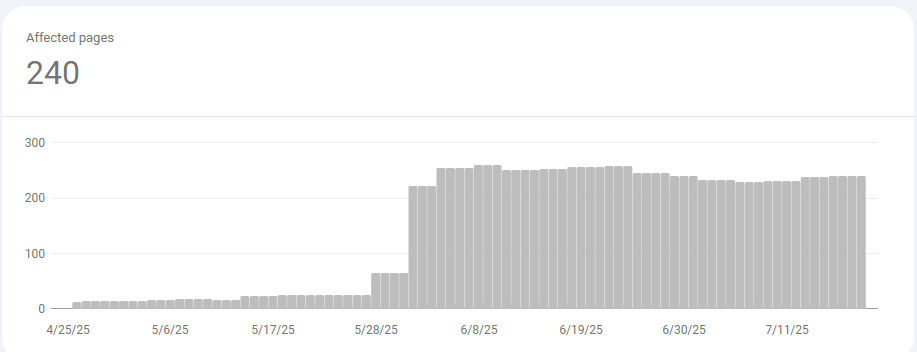
Hello! AMA is a site that introduces various marketing-related information and agencies, and we operate it as a platform for gaining diverse insights and conducting tests. While doing my routine check on indexing and visitor numbers through Search Console, I was suddenly hit with a warning that over 250 pages were not indexed. This prompted me to start writing this journal. 😱 The 'Crawling Error' Disaster: 250 Errors Struck Out of Nowhere 240 pages failed to be indexed The "Crawled - currently not indexed" error count, which usually hovered around 20-30, skyrocketed to over 200 pages overnight. The source of the problem was listed not as 'Website' but as 'Google systems'. This meant it wasn't a technical issue with individual pages, but rather a "collective indexing refusal" by Google's systems, which had determined that our website's overall page quality had serious problems. For a website operator, this was a devastating crawling error, equivalent to a death sentence. 🤔 Cause Analysis: Low 'Page Quality' Ruined Everything An example of our thin website content What on earth was the problem? After some thought, I recalled the 'Marketing Agency' pages, which were filled with thin content . In my rush to build out the pages and introduce as many companies from as many countries as possible, I focused only on the quantity of listings. As a result, each page lacked depth and failed to provide real value to users, becoming a classic case of 'Thin Content'. Initial indexing was normal, but it was followed by 240 pages of indexing errors. As you can see from the image above, Googlebot had diligently crawled these hundreds of pages initially, so they were indexed at first. However, it seems Google later determined that "this information is not valuable enough to be shown in search results" and refused to continue indexing them. Blog page affected by the indexing error: https://www.allmarketingagency.com/post/how-to-build-a-well-exposed-website Ultimately, this meant that these low-quality pages significantly dragged down the site's average page quality, to the point that even our content-rich blog posts started experiencing indexing errors. 🛠️ Beginning Major Surgery to Recover 'Page Quality' Since AMA is a site dedicated to providing diverse information and insights, I believe this is a great opportunity to solve these Page Quality (PQ) and crawling issues and share the experience. As of July 24th, I have started a project to resolve this critical crawling error and restore our collapsed page quality. Step 1: 🗑️ Content Cleanup: First, I started by tackling the 250+ low-quality pages that were the main culprits of the crawling error. For pages that can be improved, I plan to completely rewrite them to enhance their content and raise the site's average page quality. Step 2: ✅ Request Revalidation from Google: Once the cleanup is complete, I will request a 'Validate Fix' through Search Console. This is an official request to Google, essentially saying, "We have recognized and resolved the issue, so please give us another chance." Step 3: 📊 Intensive Monitoring: Afterwards, I will closely track and document the entire process—how the crawling error numbers change and whether the page quality improvements lead to actual indexing. This crawling error is undoubtedly a painful failure. However, it has also been a valuable lesson, making me realize the critical importance of page quality firsthand. I plan to consistently share this recovery process through the blog, hoping to be of some help to others facing similar challenges. 🙋‍♂️ Have you ever struggled with sudden crawling errors or page quality issues like me? Please share your valuable experiences and questions in the comments. I'd love for us to put our heads together and find solutions. 📚 # Helpful Resources Google Search Central: Index Coverage Report : This is Google's official guide to various crawling errors. Google Search Central: Creating helpful, reliable, people-first content : This is a must-read document for understanding the standards of high-quality pages.

Meta(Facebook) Test A: First Step in Ad Optimization

Checking the difference in performance from text, exposure location, and ad format* (This test continuously changed exposure location, budget, and text to identify the best-performing ads.) Popular text: "😁Find an advertising agency quickly!” Ad format: 'Collection' Exposure location: 'Audience Network' Popular text: "😁Find an advertising agency quickly!” Ad format: ' Collection' Exposure location: ' Audience Network' Ad Settings Ad (material, format) setting: Traffic 1. (Plan A) Traffic campaign_Ad format 4 (image, video, slide, collection) 2. (Plan B) Traffic campaign_Ad format 1 (image) Ad running period (April 26, 2024 ~ May 13, 2024) Setting cost: 10RM, 20RM, 60RM, etc., continuously changing Exposure location: Set to manual Audience Network after using Advantage Text 😍Find an online advertising agency quickly! ❤️Find a marketing agency quickly! 🎶Find a marketing agency quickly! 🗣Find a global marketing agency quickly! 😁Find an advertising agency quickly! Ad material Image Video Slide (created using image) Collection (set main as video, next as image) [A/B Test Result] Type Version Performance Cost per Result Result Reach Exposure Expenditure Confidence Level Traffic (A)2024-05-07| Traffic | 4 ads Win 1.219269406 219 125000 18344 267.02 MYR 86% Traffic (B) 2024-05-06| Traffic | 1 ads Lose 1.700638298 94 107000 20058 159.86 MYR 14% *The above graph is a figure obtained using the Meta (Facebook) A/B test function. A confidence level of 90% or more means statistically reliable results, and a confidence level of 65% or more means good performance. The above figure is an estimate and does not guarantee the causative result of the study. Results: 86% reliability, better for '4 advertising materials' [Comparison of Ad Sets] Ad Set Exposure Reach Link Clicks Clicks (Total) Result CTR CPC CPM (Plan A) 4 Ad Materials 33,553 16,695 658 655 658 1.95% RM1.04 RM20.35 (Plan B) 1 Ad Material 20,473 12,820 97 123 97 0.60% RM1.34 RM8.03 Results Plan A (4 Ad Materials)  has a higher CTR 1.35% compared to Plan B (1 Ad Material) Plan A (4 Ad Materials)  is 90 cents cheaper in CPC than Plan B (1 Ad Material) Plan A (4 Ad Materials)  has a CPM (Cost per 1000 exposures) 3696 KRW more expensive than Plan B (1 Ad Material) Due to the characteristics of Meta (Facebook) ads that show ads and ad sets with good efficiency, Plan A (4 Ad Materials) is considered to have been exposed relatively more. [Ad Comparison] Ad Format Exposure Reach Link Clicks Clicks (Total) Result CTR CPC CPM Video 58 57 2 2 2 3.45% RM0.54 RM18.45 Collection 22,097 9,486 595 586 595 2.65% RM0.99 RM26.15 Slide 7,077 4,874 36 37 36 0.52% RM1.59 RM8.33 Image 19 17 - - - - - RM18.42 Ad Format Exposure Reach Link Clicks Clicks (Total) Result CTR CPC CPM Image 16,667 11,086 73 93 73 0.56% RM1.29 RM7.17 Results In 'Plan A (4 Ad Materials)', exposure is focused on specific ad materials In 'Plan A (4 Ad Materials)', although the CTR is 3.45%, it is excluded because the number is too small, and the most excellent ad is the collection with a CTR of 2.65%. CPC (cheaper in order) (1) Plan A (4 Ad Materials)_Video: 0.54RM(2)  Plan A (4 Ad Materials)_Collection: 0.99RM (3)  Plan B (1 Ad Material)_Image: 1.29RM (4)  Plan A (4 Ad Materials)_Slide: 1.59RM CPM (expensive in order) (1) Plan B (1 Ad Material)_Image: 7.17RM(2)  Plan A (4 Ad Materials)_Slide: 8.33RM (3)  Plan A (4 Ad Materials)_Video: 18.45RM (4)  Plan A (4 Ad Materials)_Collection: 26.15RM 'Collection' is the most exposed (78%), followed by slide exposure (24%)  During the process, the 'Collection' ad type was focused and conducted, so the 'number of exposures' is x considering the confidence level. [Uniqueness by Text] 💡 Limitation: Since only one text can be created in the collection and slide, it was compared only in video and image. Top 3 Text "😁Find an advertising agency quickly!" Exposure 2.670 / Reach 2,204 / Link Click 26 / CTR 1.09% "🎶Find a marketing agency quickly!" Exposure 4,001 / Reach 3,265 / Link Click 14 / CTR 0.50% "❤️Find a marketing agency quickly!" Exposure 2,996 / Reach 2,589 / Link Click 11 / CTR 0.67% 1 / CTR 0.67% Results In the case of 'Text 1', although the number of exposures is relatively lower than 'Text 2', it produces higher results in CTR and link clicks. [Exposure Location] 💡 Top Position performance (Written based on results.)   Plan A_4 Ads Materials (image, video, collection, slide))  Audience Network native, banner, and full-page ads: Exposure 16,537 / Reach 7,106 / Link Click 491 Audience Network Reward Video: Exposure 5,360 / Reach 2,263 / Link Click 103 Facebook Feed (Video): Exposure 8,579 / Reach 5,046 / Link Click 43 Plan B_1 Ad Material (image) Facebook Facebook Feed: Exposure 12,718 / Reach 8,118 / Link Click 40 Audience Network (Native, Banner, and Full-Page Ads): Exposure 3,174 / Reach 1,156 / Link Click 4 Instagram Feed: Exposure 209 / Reach 140 / Link Click 20 Plan A ads (Collection) Exposure Reach Outcome CTR CPC CPM Audience Network (Native, Banner and Full screen) 16,490 7,375 491 2.93% RM0.94 RM27.53 Audience Network (Rewarded Video) 5,361 2,304 103 1.90% RM1.18 RM22.40 Plan B ads (Collection) Exposure Reach Outcome CTR CPC CPM Facebook Facebook Feed 12,718 8,118 40 0.46% RM1.39 RM6.32 Audience Network (Native, Banner and Full screen) 3,174 1,156 4 0.09% RM3.07 RM2.90 Results In case of Plan A (4 Ad Materials), results mainly occur in Audience Network , and for Plan B (1 Ad Material), results mainly occur in 'Facebook Facebook Feed'. Both are mobile apps, which is a unique point. In the case of   Plan B (1 Ad Material), the result of 20 and CTR 10% was achieved in 'Instagram Feed'.

Meta (Facebook, Instagram) Advertising Tips “Is there anything that you have analyzed more thoroughly than this (Meta Ads)?”

Meta (Facebook, Instagram) Advertising Tips “Is there anything that you have analyzed more thoroughly than this (Meta Ads)?” ✔️Test *It was conducted in a total of three tests. Meta(Facebook) Test A: First Step in Ad Optimization Meta(Facebook) Test B: Possible to optimize advertisements? Meta(Facebook) Test C: Don’t believe A/B Test 🅰️ Conclusion Meta (Campaign)  can have the most dramatic effect for mobile-friendly services (products). 'Advertising Optimization'  should be carried out based on the advertisement. Rather than relying on the 'confidence level'  from A/B test results , manage your ads based on actual advertising experience and numbers. If you're unsure of the best ad material and format during the initial ad setting , try setting up two ad sets, with three to six ads each . Do you know that different types of CTRs? The CPC of an image could be the most expensive! Try using an ad format (design) that can show various designs and products at once . The most effective way to improve ad performance is to turn 'OFF' in the 'Ad Set' rather than turning 'OFF' the 'Ad'. Turning 'OFF' the 'Ad' is also a good method for operation management. As far as possible, use 'Advantage+Exposure' instead of 'Manual Exposure'  for ad exposure locations. ❓ Curiosity? You may have heard that creating many ads in Meta (Facebook)  can yield better results. In fact, the maximum number of ads that can be created in an 'Ad Set'  is up to 50 per Ad Set . So, can we see the best results by creating 50 ads in one Ad Set? Meta (Facebook) recommends keeping the number of ads for ad performance to six or less . While an exact number is not given, it is generally recommended to set the number of ads to six or less, and any more than that would make little difference. (Meta recommend to use at least 10 ~ 20 Ads for ASC(Advantage Shopping Campaign) Based on the above, we conducted a test to see how much difference can be made if we proceed with a difference in the number of 'creative (ads)'. Also, based on the results, we tested and analyzed variables related to associated parts, so we recommend it as a reference for those who operate Meta (Facebook) ads. 💻Learn more about the conclusion! Meta (Campaign) is expected to have the most dramatic effect for mobile-friendly services (products). Exposure Device Mobile Desk Exposure Location Audience Network native, banner and full-page ads Audience Network Reward Video Facebook profile feed Facebook Reels Facebook Story Facebook Feed Facebook In-Stream Video Facebook search results Facebook Feed: Video Feed Instagram Browse/Explore Tab Instagram Explore Home Instagram Reels Instagram Story Instagram Feed Messenger Inbox Facebook Feed Facebook In-Stream Video Facebook Right Column Instagram Story Instagram Feed Total 15 5 The table above distinguishes devices by exposure location. Despite variations depending on each ad format (image, video), you can easily see that mobile is overwhelmingly dominant. [image update] Looking at the test results conducted so far, we can confirm that over 80% of the exposure occurs on smartphones when analyzed by 'exposure device'. Based on this data and information, we can predict that customers who visit through ads operated on Meta will naturally visit the product (service) via mobile. Are your products (services) operating mobile-friendly services?  If the answer is "No," why not consider whether you really need Meta (Facebook) ads? (Please actively operate features like 'Call' in your ads.) For services providing high-value products or information, use traffic and awareness campaigns instead of sales campaigns as conversions often occur on PCs rather than mobile. For products (services) that receive a lot of inquiries, actively use the call feature. For e-commerce services, set up the landing page to have a payment function that can be immediately purchased on mobile. Use separate landing pages optimized for mobile UX and UI. ‘Optimization’  try to be conducted based on the ads. How long do you work on optimization when running ads on Meta? Do you optimize ads until satisfactory figures come out? Or do you not proceed because you don't know how to optimize? If you don't have clear criteria, why not try optimizing based on the ads? Campaign Performance (CTR (Total)) Collection CTR (Total) Collection CPC (Total) Excellent Ad Material Test A Campaign 1.44% 2.65% RM 0.99 Collection Test B Campaign 2.24% 2.72% RM 0.82 Collection Test C Campaign 2.23% 2.55% RM 0.86 Collection Based on these results, the ad optimization process involved changing campaign ad set settings, changing text, changing age, etc. , and ultimately, we were able to achieve better results from the 'Test B Campaign' and 'Test C Campaign' than from the 'Test A Campaign'. However, despite these settings, we confirmed that there was no significant change in the performance metrics of the ad , and based on these test results, we found that the increase in performance of a specific campaign or ad set is largely influenced by ad changes, and the ad performance according to subsequent settings is less influential. Based on this, if you set the goal of your optimization work to the 'best ad metrics', it is judged that you can operate based on concrete and clear metrics, not 'simple expected metrics'. CTR (Total) CPC (Total) Test D: Campaign (Advantage+Exposure Position)_Single Collection Ad Setting 2.44% RM 1.24 Test D: Campaign (Manual Exposure Position)_Single Collection Ad Setting 1.44% RM 2.00 Test E: Campaign (Advantage+Exposure Position)_Single Image Ad Setting 0.50% RM 1.70 Test E: Campaign (Manual Exposure Position)_Single Image Ad Setting 0.47% RM 1.62 However, as in the above data, there can be differences in performance depending on the 'advantage' feature in the 'ad set' and the number of ads.  Therefore, I think it is necessary to analyze the differences in performance according to these features before optimization. Please operate ads based on actual ad experience and numbers,  rather than understanding the 'confidence' that comes from ‘A/B test’ results. In this test processed 3 times. As a result, we could confirm a high confidence of 86% (Test A), 86% (Test B), and 87% (Test C). However, opposite results appeared in 'Test B' between 'Test C,' where all settings were the same. Of course, there could be various reasons for these results, but surprisingly, the overall ad metrics came out similar. Specifically, the differences in 'cost per result', 'excellent ad CTR', and 'not excellent ad CTR' were '0.01RM (3 KRW)', '0.06%', and '1.93%', respectively, which was the same figure in the case judged not excellent. As can be seen in these 'A/B test' results, it is necessary to analyze the numbers in the ad manager as well as the 'A/B test' data. If you don't know the best ad material and format from Meat Business Manager , try setting 2 ad sets, 3 to 6 ads in each set. When running Meta (Facebook) ads, each ad set can contain anywhere from '1 ad to a maximum of 50 ads,' but Meta (Facebook) recommends setting 6 or fewer ads. The reason is that when too many ads are posted in Meta (Facebook)'s ad performance optimization method, ‘machine learning’ , the individual ad posting frequency decreases and more budget is spent on performance optimization. Based on the above information, I set 4 ads and 1 ads each on two ad sets to broaden the choice of machine learning and operate the most efficient ad test. (If you want to set different ads by language and country, it is recommended to combine ad sets and use multiple language functions for performance.) Test Exposure Result CTR (Total) CPC (Total) Test A 4 ad settings 33,553 658 1.95% Test A 1 ad setting 20,473 97 0.60% Test B 4 ad settings 4,743 119 2.49% Test B 1 ad setting 3,727 74 1.93% Test C 4 ad settings 4,821 93 1.93% Test C 1 ad setting 4,634 120 2.55% Test D 1 ad setting (Advantage+Exposure Position) 1,882 46 2.44% Test D 1 ad setting (Manual Exposure Position) 2,013 30 1.49% In the test results, 'Test A' conducted before ad optimization had a relatively low CTR (Total), and the CTR (Total) in optimized 'Test B', 'Test C', 'Test D' did not show a big difference regardless of the number of ads. However, the CPC in 'Test D' was paying a higher cost than 'Test A' conducted before optimization. Especially, compared to the CPC costs of 0.86 and 0.82, which have similar CTR (Total) in 'Test B' and 'Test C', a difference of about 100 KRW(KRW) can be seen. Test Exposure Result CTR (Total) CPC (Total) Collection from 4 ad settings in Test A 22,097 595 2.65% Collection from 4 ad settings in Test B 4,086 112 2.72% Collection from 1 ad setting in Test B 3,727 74 1.93% Collection from 4 ad settings in Test C 4,466 93 2.08% Collection from 1 ad setting in Test C 4,634 120 2.55% Collection from 1 ad setting in Test D (Advantage+Exposure Position) 1,882 46 2.44% Collection from 1 ad setting in Test D (Manual Exposure Position) 2,013 30 1.49% If we look at the ‘Collection’, which is the best ad in the 'ad setting,' there was a difference of 0.2 ~ 0.3% in CTR (Total), but they all had similar figures. It's different from CPC (Total). For this reason, it was judged that if an optimized 'ad setting' is possible, there would be no big difference in performance even if only one 'ad' is set. Nevertheless, we recommend setting '2 ad sets' and '3 or more ads' through this test because of the possibility that the difference in CPC (Total) can occur due to machine learning, and it appears to be the best way to achieve maximum performance. However, too many ad sets can cause auction overlap , which can slightly affect performance. Do you know that CTR types are different? You may have seen high click rates and results when running ads, but the number of people who actually buy or visit the website is unusually small. There can be various reasons, but it occurs when one person clicks multiple times. You can use 'Unique CTR' as a way to minimize this difference. 6 types of CTR distinguished by Meta (Facebook) CTR (Total) The ratio of clicks to total impressions. CTR (Link Click-Through Rate) The ratio of link clicks to total impressions. Unique CTR (Link Click-Through Rate)_Estimate The ratio of link click behavior by unique people who saw the ad. Outbound CTR (Click-Through Rate) The ratio of outbound clicks to total impressions. Unique Outbound CTR (Click-Through Rate)_Estimate The ratio of outbound click behavior by unique people who saw the ad. Unique CTR (Total)_Estimate The ratio of click behavior by unique people who saw the ad. You can check the above 6 types of CTR in the 'Performance and Clicks' column of the ad manager. Are you monitoring ads in real time? You may be monitoring ads in real time after launching the ads. However, please note that the initial data after launching the ads may not be accurate because it is in the learning phase . Therefore, it would be good to wait for at least 24 hours after the ad launch and then check the ad performance. However, if there is a critical issue in the operation of the ads, such as the ads not being exposed at all or the cost per result being too high, please check the ads immediately. Consider using ad formats (designs) that can showcase various designs and products at once. In this test, we used the same image for video, image, slide, and collection ads. Interestingly, all three tests showed significantly higher performance in the ‘Collection’ format. Of course, the results may vary depending on the service (product), industry, and various environments and situations, but it seems worth trying to operate ads using designs and formats that can showcase multiple designs and products at once to expect good results. Image CPC  can also be the most expensive! Generally, many people believe that the cost of CPC is lowest for images. However, the correct answer is actually “It depends on the results.” When checking the image CPC from actual ads, it was relatively high at RM 1.34. [image update] [image update] On the other hand, collection and video CPCs were RM0.99 and RM0.54, respectively, which were cheaper. If you are considering ad creation with CPC in mind, you will find that the most important thing is not the format of the content but the most optimized ad creation. The best way to improve ad performance metrics is to turn off ads at the ‘ad set’ level rather than turning off individual ads, which is more efficient, although  turning off individual ads is also a good method for operational management. If you operate ads by adding specific ads or turning them on and off to improve performance metrics, try turning them on and off at the ad set level from now on. In the case of Meta Ads, machine learning is performed based on the ad set, and the most excellent ad within the ad set is found and operated intensively during the machine learning process. Intentionally turning off or adding specific ads during this process can lead to additional opportunity costs and potentially turning off optimized ads. For these reasons, the most ideal way to improve ad performance is to set up ad sets and only turn off underperforming ads (low-performing ads, limited machine learning ads), and create new ad sets for new content. This is a more efficient way to operate. If multiple ad settings need to be set or operated continuously, you can use ‘Advantage Campaign Budget’ for more comfortable operation, although A/B testing will not be possible. For ad placement, use ‘Advantage+ Placement’ rather than ‘Manual Placement.’ Through three tests, we found the most popular placements and tested them using ‘Manual Placement’ and ‘Advantage+ Placement.’ Using the most popular ‘Collection’ ad and the least performing ‘Image’ content based on previous ad results, we set up and conducted the tests. Test Name Placement Result CTR (Overall) CPC (Overall) Test D (Collection): Advantage+ Placement 1,882 46 2.44% RM 1.24 Test D (Collection): Manual Placement 2,013 30 1.49% RM 1.93 Test E (Image): Advantage+ Placement 7,972 31 0.39% RM 2.19 Test E (Image): Manual Placement 8,536 27 0.32% RM 2.40 In conclusion, the most excellent performance was achieved with ‘Advantage+ Placement.’ Although continuous testing is necessary depending on the campaign, industry, service, and other factors, this test showed that ‘Advantage+ Placement’ brought higher performance for traffic campaigns. The difference in CTR (Overall) was up to 1% higher, and the CPC (Overall) was up to 200 KRW lower. While finding meaningful specific placements through actual user behavior analysis and operating accordingly is essential, if the goal is simply to increase traffic or go through the optimization process, try operating in the manner described above. 📖 Reference Campaign, ad set, and ad limits per ad account Advertising count management information Machine Learning Step Information Machine Learning Step Guide

Don't Run Meta(Instagram, Meta) Ads If You Don't Know This!

We've discovered some fascinating insights and data shifts while running an ad campaign for a free seminar on optimizing Instagram grids. If you're managing Meta ads, you must read this! 🔹 Campaign Overview 📅 Ad Run Period: February 3 – February 6 📌 Campaign Name: 250130_Traffic_Instagram-optimize-feed Ad Set Details: 🔹 EN_Instagram-optimize-feed (English) *Target Location: Dubai (UAE) *Dynamic Creative: ON *Ad Format: 2 Video Ads 🔹 KR_Instagram-optimize-feed (Korean) *Target Location: South Korea *Dynamic Creative: ON *Ad Format: 2 Video Ads 🎯 Ad Goal: Recruiting participants for a free Instagram feed optimization seminar. 🚨 Landing Page Issue: The landing page was not indexed on Google, making it difficult to access through organic search. Google Indexing situation 🔹 Ad Performance Analysis 1️⃣ Performance Differences by Country Despite using the same budget and setup, there was a significant performance gap between countries. Meta(Facebook, Instagram) Marketing Performace 📊 Meta (Facebook & Instagram) Ad Results: Ad Set Name Country Conversions KR_Instagram-optimize-feed 🇰🇷 South Korea 18 EN_Instagram-optimize-feed 🇦🇪 Dubai 73 📌 Analysis: 4x higher conversion rate in Dubai compared to South Korea. (The gap continues to widen over time.) Differences in competition, ad optimization algorithms, and target market(Country) characteristics affect campaign performance. Budget allocation must consider country-specific performance differences in Meta ads. 2️⃣ GA4 Data Discrepancies for Meta Ads Page view from GA4 based on UTM 📉 Issue: Traffic from Meta ads was not accurately recorded in GA4(Google Analytics 4) 📌 Meta landing page visits: 91 but GA4 UTM-tracked visits: 9 (90% discrepancy!) 📌 Possible Cause: Since most users access Meta ads via mobile, browser and device tracking limitations may cause data loss. 3️⃣ Meta Ads Showing Incorrect Country Data Page view from GA4 by country Although the ad was only targeting Dubai (UAE) , GA4 showed a surge of traffic from the USA. *Traffic only occurs to US users until February 4th, then traffic occurs from the United Arab Emirates from February 5th 📌 Double-Checking the Issue: ✅ Ad settings confirmed the target location was correctly set to Dubai. ✅ Facebook Ads Manager reported UAE as the traffic source. ✅ GA4 real-time data was tested by deliberately generating traffic from Korea and Dubai. ✅ UTM tag analysis found that 3 out of 9 tracked users were from the USA. 🔹 Key Takeaways for Running Meta Ads 1️⃣ Consider Performance Differences by Country Even with the same budget and settings, ad effectiveness varies by country. For global campaigns, adjust budget and targeting based on each region’s characteristics. Regular monitoring & real-time adjustments are crucial for optimization. 2️⃣ GA4 Alone is Not Reliable for Meta Ad Tracking GA4 may miss or misrecord Facebook ad traffic. To get accurate data, use Facebook Events Manager and Ads Manager in addition to GA4. 3️⃣ Meta Ads May Display Incorrect Country Data The ad target location and actual traffic source may not match. Regularly track ad performance using multiple platforms, UTM tags are essential for real-time data tracking. ✅ What’s Your Experience? Have you noticed discrepancies between Meta ads and GA4 data? Or have you encountered country-specific performance differences? 💬 Share your thoughts in the comments! 😊

Step1

Fulfill the form

Step2

Schedule time

Step3

Online Support

Step4

Final email

How we support?

Why other have appiled?

While working at the company, I encountered SEO for the first time due to internal budget constraints. The initial experience was not easy, but as the content I created began to gain visibility with popular keywords over several months, I developed an interest in SEO. This led me to start studying SEO in more detail. When I first approached SEO, I thought it was primarily about content creation, title writing, and crafting descriptions. However, as I delved deeper into my studies, I learned about the true importance of SEO and became even more intrigued. This newfound interest prompted me to sign up for this lecture and even a One-on-One session.
TaeHoon

TaeHoon

SEOMAN

I recently joined the marketing team and quickly realized the importance of SEO. Initially, I found keyword research and content optimization challenging, but after a few attempts, I started to see an increase in website visitors, which sparked my interest. That's why I decided to apply for this One on One session to gain deeper knowledge.
Emily

Emily

I started learning about SEO while running a small online store. At first, it felt overwhelming, but after experiencing my products being displayed in search engines, I became eager to learn more. That's why I decided to apply for this One on One session to gain insights into effective marketing strategies.
Stevin

Stevin

While managing the company's blog, I recognized the necessity of SEO. Initially, I thought it was just about writing content, but as the search rankings improved, I realized the importance of SEO. I decided to apply for this course to gain more information and seek personal advice during the One on One session.
James

James

While working as a freelancer, I decided to learn SEO to help increase my clients' website traffic. I started with the basics, but as I began to see results, my interest grew. I applied for the One on One session to gain deeper insights.
Sang-Hyun

Sang-Hyun

bottom of page